
Restaurant Table Management for WordPress: Complete Guide for Modern Restaurants
Managing restaurant tables manually can quickly become stressful. A few phone calls, walk-ins, online reservations, table changes, no-shows, and late arrivals can turn a normal service into a confusing operation.
That is why modern restaurants need a better restaurant table management WordPress solution.
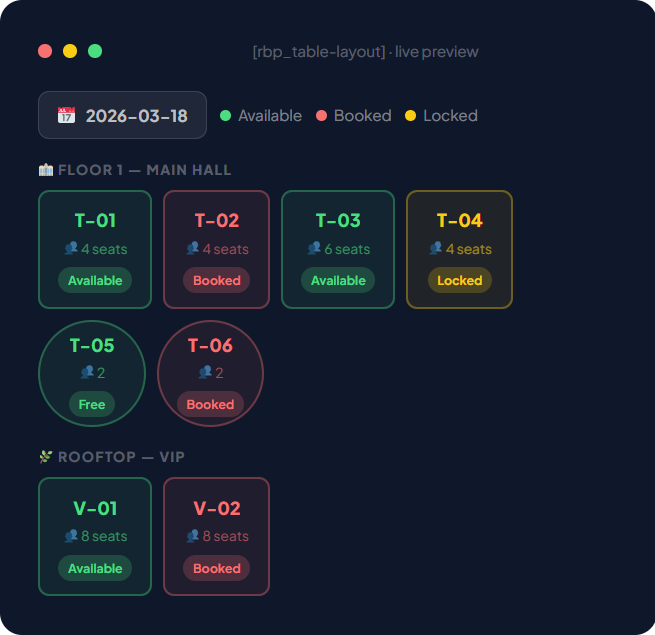
If your restaurant website is built on WordPress, you should not need a separate SaaS platform, spreadsheet, paper notebook, or disconnected calendar just to manage reservations. With the right WordPress restaurant booking plugin, you can accept online table reservations, manage real-time availability, assign guests to tables, collect deposits, send reminders, track guest history, and improve repeat bookings from one system.
JavisTab is built for this exact workflow: online booking, restaurant floor plan, CRM, payments, reminders, waitlist, and customer management inside WordPress.
What Is Restaurant Table Management for WordPress?
Restaurant table management for WordPress is the process of managing table reservations, guest capacity, seating availability, floor plans, booking rules, payments, reminders, and customer data directly from a WordPress website.
Instead of using only a contact form or a basic booking calendar, a proper restaurant table management system helps restaurants control the full reservation journey:
- Guest selects date, time, and party size
- System checks real-time availability
- Available tables or seating areas are matched
- Guest receives confirmation
- Restaurant receives booking notification
- Deposit or prepaid booking can be collected
- Reminder is sent before the visit
- Staff manage arrivals, seating, no-shows, and waitlist
- Guest history is saved in CRM
- Follow-up or review request is sent after the visit
This turns a simple reservation into a complete guest management workflow.
Why Restaurants Need More Than a Basic Booking Calendar
Many WordPress booking plugins are built for appointments, not restaurants. They can show available time slots, but they often do not understand how real restaurant operations work.
Restaurants need more than “choose a time and submit.”
A real restaurant booking system should understand:
- Table capacity
- Seating areas
- Floor plan layout
- Party size rules
- Combined tables
- Time slots
- Turnover time
- Buffer time
- Walk-ins
- Deposits
- Waitlist
- No-show risk
- Guest preferences
- VIP guests
- Repeat visitors
- Multi-location operations
A generic calendar can show time availability. But a restaurant needs to know whether Table 4 is free, whether two tables can be combined for a group of 8, whether the terrace is available, whether a high-value booking has paid a deposit, and whether a guest has missed reservations before.
That is the difference between basic scheduling and real table management.
Key Problems with Manual Restaurant Table Management
Manual table management may work when a restaurant is small. But as bookings increase, problems appear quickly.
1. Double Bookings
If reservations come from phone calls, website forms, Facebook, Google Business Profile, WhatsApp, Instagram, and walk-ins, staff may accidentally accept overlapping bookings.
A real-time WordPress restaurant reservation system helps centralize bookings and reduce double-booking risk.
2. Poor Guest Experience
Guests expect fast confirmation. If they submit a form and wait hours for a reply, they may book somewhere else.
Instant online table booking makes the experience easier and more professional.
3. Lost Revenue from No-Shows
When guests do not arrive, the restaurant loses table time, staff preparation, and potential revenue. This is especially painful during peak dinner service, weekends, holidays, and special events.
Deposits, reminders, and confirmation workflows help reduce this risk.
4. No Customer History
Without CRM, every booking looks like a new booking. Staff cannot easily see whether the guest is a VIP, a repeat customer, a no-show risk, or someone with special preferences.
A restaurant booking plugin with CRM helps turn every reservation into useful guest data.
5. Weak Follow-Up
Many restaurants lose the opportunity to request reviews, send offers, or encourage repeat visits after the booking is completed.
A modern system should help automate follow-up communication.
Essential Features of a WordPress Restaurant Table Management Plugin
When choosing a table booking plugin WordPress solution, focus on operational features, not only booking form design.
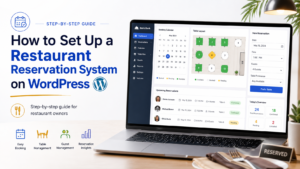
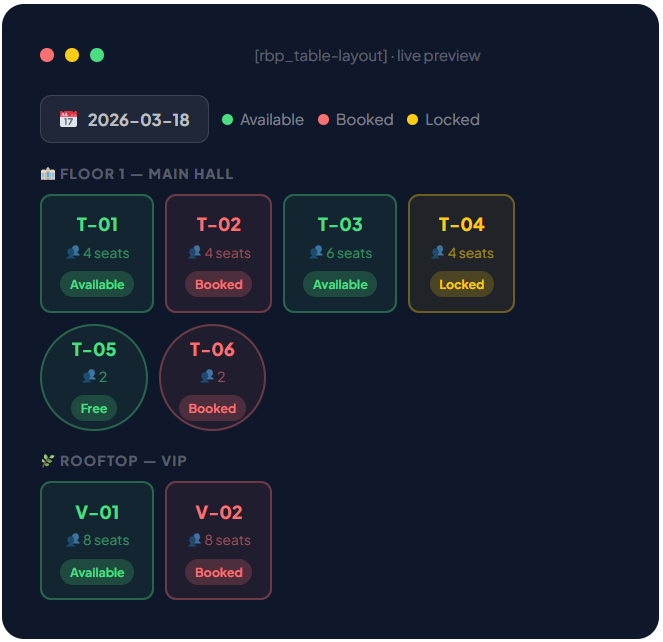
1. Real-Time Restaurant Floor Plan
A floor plan helps staff manage the restaurant visually.
Instead of only seeing a list of reservations, your team can view tables, rooms, areas, and booking status in a layout that matches the restaurant.
Useful floor plan features include:
- Table layout view
- Multi-room support
- Multi-floor support
- Table capacity settings
- Table status: available, booked, seated, completed, no-show
- Drag-and-drop table assignment
- Combined table support
- Area-based booking
- Live availability updates
For restaurants, this is one of the most important differences between a general booking calendar and a real restaurant reservation system.
2. Party Size and Capacity Control
A restaurant table management system should understand guest count.
For example:
- Table 1 seats 2 guests
- Table 2 seats 4 guests
- Table 3 seats 6 guests
- Private room seats 12 guests
- Outdoor terrace has limited availability
- Large parties require approval or deposit
The system should prevent a party of 6 from booking a 2-seat table and help staff assign the right table for each reservation.
3. Time Slots and Turnover Rules
Restaurants do not only manage dates. They manage service flow.
A booking system should allow you to configure:
- Lunch and dinner shifts
- Opening hours
- Last booking time
- Peak-hour rules
- Table turnover time
- Buffer time between bookings
- Maximum bookings per slot
- Different rules by weekday
- Holiday and special event rules
This helps your restaurant stay organized during busy periods.
4. Online Deposits and Prepaid Bookings
Deposits can help reduce no-shows and protect high-value reservations.
Examples:
- Weekend dinner deposit
- Large group booking deposit
- Valentine’s Day prepaid menu
- Private dining room deposit
- Buffet reservation deposit
- Event or party booking deposit
- Tasting menu prepayment
A strong restaurant table management plugin should support:
- Pay later
- Fixed deposit
- Percentage deposit
- Full prepayment
- Payment status tracking
- Refund or cancellation policy
- Admin payment notes
With JavisTab, restaurants can connect booking and payment workflows so reservations are more reliable.
5. Automated Email and SMS Reminders
Many no-shows happen because guests forget, book casually, or do not receive a clear confirmation.
Automated reminders help reduce this problem.
Recommended reminder workflow:
- Instant booking confirmation
- Reminder 24 hours before visit
- Reminder 6 hours before visit
- Cancellation or reschedule link
- Staff notification for pending bookings
- No-show alert
- Post-visit review request
A good WordPress restaurant reservation plugin should support email reminders, SMS reminders, and calendar invite workflows.
6. Guest CRM and Booking History
A booking is not just a table request. It is a customer relationship.
Restaurant CRM features can help you track:
- Guest name
- Phone number
- Email address
- Visit history
- Total bookings
- No-show history
- Favorite table or area
- Birthday
- VIP status
- Dietary notes
- Special requests
- Customer tags
- Loyalty information
- Review history
This helps your team deliver better hospitality and improve repeat bookings.
7. Waitlist Management
When a time slot is fully booked, most restaurants simply lose the guest. But a waitlist can recover that demand.
A waitlist system allows guests to join a backup list when their preferred time is unavailable.
Useful waitlist features include:
- Guest joins waitlist for a date/time
- Staff can manually approve
- System can notify guest when a table becomes available
- Guest can confirm or decline
- Staff can promote waitlist guest into confirmed booking
This is especially useful for popular restaurants, buffet restaurants, fine dining venues, cafés, and event nights.
8. Multi-Location Restaurant Support
If your restaurant group has more than one branch, your booking system should support multiple locations.
Important features include:
- Separate restaurant locations
- Separate floor plans
- Different opening hours
- Different table layouts
- Different staff access
- Location-specific booking rules
- Location-specific payment settings
- Central CRM across locations
This helps restaurant groups manage operations without creating a messy system.
How JavisTab Helps Restaurants Manage Tables in WordPress
JavisTab is an all-in-one WordPress booking plugin built for real business operations, not only calendar scheduling.
For restaurants, JavisTab helps manage the complete reservation workflow:
- Online table reservations
- Real-time floor plan and resource control
- Table and seating capacity management
- Multi-floor and multi-room layout
- Booking rules and time slots
- Deposits, prepaid bookings, and pay-on-arrival options
- Customer CRM and booking history
- Email and SMS reminders
- Waitlist and booking recovery
- Loyalty and repeat booking workflows
- Review request automation
- Multi-location support
- Printable invoices and payment records
Instead of using separate plugins for booking, CRM, payments, reminders, loyalty, and review follow-up, JavisTab brings the core restaurant workflow into one WordPress-based system.
Restaurant Table Management Workflow with JavisTab
Here is how a typical restaurant booking workflow works with JavisTab.
Step 1: Guest Visits Your WordPress Website
The guest lands on your restaurant website from Google, social media, Google Business Profile, email, or direct search.
They click your booking button and open the reservation form.
Step 2: Guest Selects Date, Time, and Party Size
The booking form asks for key reservation details:
- Date
- Time
- Number of guests
- Service area if needed
- Special request
- Contact details
The system checks availability based on your table setup and booking rules.
Step 3: System Matches Availability
JavisTab checks available tables, capacity, time slot rules, and restaurant settings.
If the selected time is available, the guest can continue. If not, the system can show alternative options or allow waitlist registration.
Step 4: Guest Confirms or Pays Deposit
Depending on your policy, the guest can:
- Confirm booking without payment
- Pay a fixed deposit
- Pay a percentage deposit
- Prepay the full amount
- Submit booking for manual approval
This gives your restaurant more control over high-demand bookings.
Step 5: Confirmation and Reminder Are Sent
The guest receives a confirmation message. Your team receives booking details.
Before the visit, automated reminders can be sent to reduce no-shows and improve attendance.
Step 6: Staff Manage the Floor Plan
During service, staff can view bookings by date, time, table, floor, room, or status.
They can update reservation status:
- Confirmed
- Pending
- Seated
- Completed
- Cancelled
- No-show
This helps the front-of-house team stay organized.
Step 7: CRM Saves Guest Data
After the booking, the guest profile is updated with booking history, notes, preferences, and visit activity.
This helps your restaurant build long-term relationships instead of treating every reservation as a one-time transaction.
Step 8: Review or Rebooking Follow-Up
After the visit, the restaurant can send a review request or follow-up message.
Happy guests can be encouraged to leave a public review, while unhappy feedback can be handled privately.
Best Use Cases for Restaurant Table Management in WordPress
JavisTab can support different types of restaurants and hospitality businesses.
Fine Dining Restaurants
Fine dining restaurants often need strict reservation control, deposits, VIP notes, dietary preferences, and special occasion tracking.
Useful features:
- Deposit collection
- Guest CRM
- Table assignment
- VIP tags
- Special request notes
- Review follow-up
Buffet Restaurants
Buffet restaurants need capacity control, time slots, group bookings, and prepaid package options.
Useful features:
- Guest count limits
- Package booking
- Deposit or full payment
- Time slot capacity
- No-show prevention
- Waitlist
Cafés and Brunch Restaurants
Cafés may need simpler booking, but busy brunch services can benefit from table availability and time slot control.
Useful features:
- Time slot booking
- Table capacity
- Quick confirmation
- Mobile booking
- Repeat customer data
Multi-Location Restaurant Groups
Restaurant groups need central control with separate location settings.
Useful features:
- Multi-location booking
- Separate floor plans
- Location-specific rules
- Central CRM
- Staff permissions
Event and Private Dining Venues
Restaurants offering events or private dining need deposits, approval workflows, and guest communication.
Useful features:
- Private room booking
- Large party rules
- Deposit payment
- Admin approval
- Custom booking notes
Restaurant Table Management vs Basic Reservation Form
A basic contact form can collect booking requests, but it does not manage restaurant operations.
| Feature | Basic Contact Form | Restaurant Table Management Plugin |
|---|---|---|
| Collect guest details | Yes | Yes |
| Check table availability | No | Yes |
| Manage floor plan | No | Yes |
| Prevent double bookings | No | Yes |
| Collect deposits | No | Yes |
| Send reminders | Usually no | Yes |
| Track guest history | No | Yes |
| Manage waitlist | No | Yes |
| Support staff workflow | No | Yes |
| Improve repeat bookings | Limited | Yes |
If your restaurant only receives a few bookings per week, a form may be enough. But if reservations are important to your revenue, a table management system is a better long-term solution.
How to Set Up Restaurant Table Management on WordPress
Follow this step-by-step process when implementing a restaurant table management system.
Step 1: Define Your Restaurant Layout
Start by mapping your physical space.
List:
- Floors
- Rooms
- Indoor areas
- Outdoor areas
- Bar seats
- Private rooms
- Table numbers
- Table capacity
- Combined table options
This gives your booking system the correct structure.
Step 2: Create Booking Rules
Define how guests can book.
Important rules include:
- Opening hours
- Lunch and dinner shifts
- Time slot length
- Maximum guests per booking
- Minimum notice time
- Maximum advance booking window
- Cancellation policy
- Deposit rules
- Large group approval rules
Clear rules help prevent confusion.
Step 3: Configure Payment and Deposit Options
Decide which booking types require payment.
Example setup:
- Standard weekday booking: no deposit
- Weekend dinner: fixed deposit
- Group of 6 or more: percentage deposit
- Special event: full prepayment
- Private room: manual approval + deposit
This keeps your restaurant flexible.
Step 4: Set Up Confirmation and Reminder Messages
Create professional message templates.
Recommended messages:
- Booking received
- Booking confirmed
- Deposit received
- Booking reminder
- Booking cancelled
- Waitlist available
- Review request after visit
Keep messages clear and short.
Step 5: Train Your Team
Your staff should know how to:
- View bookings
- Assign tables
- Update booking status
- Handle no-shows
- Check payment status
- Use guest notes
- Add internal comments
- Manage waitlist
- Respond to special requests
A good system only works if the team uses it consistently.
Step 6: Test Before Launch
Before publishing the booking form, test:
- Mobile booking
- Desktop booking
- Different party sizes
- Fully booked time slots
- Deposit payment
- Confirmation email
- Reminder email
- Admin notification
- Cancellation workflow
- Waitlist workflow
- Table assignment
- CRM profile creation
Do not launch until the full booking journey works smoothly.
Tips to Reduce No-Shows with WordPress Table Management
Restaurant no-shows can damage revenue, especially during peak hours. A table management plugin can help reduce this risk.
Use Deposits for High-Value Reservations
Require deposits for:
- Large groups
- Weekend bookings
- Holiday menus
- Private dining
- Buffet packages
- Special events
- Tasting menus
Deposits increase guest commitment.
Send Reminder Messages
Use reminders 24 hours and 6 hours before the booking.
A simple reminder can prevent forgotten reservations and give guests a chance to cancel early.
Make Cancellation Easy
If guests cannot attend, make it easy for them to cancel or reschedule. This gives your restaurant time to refill the table.
Use Waitlist Recovery
When a guest cancels, promote someone from the waitlist.
This helps recover lost revenue from cancellations.
Track Repeat No-Shows
With CRM, you can identify guests who repeatedly fail to attend and require deposit or manual approval in the future.
Measuring ROI from Restaurant Table Management
A good WordPress restaurant reservation system should improve both operations and revenue.
Track these metrics:
- Online booking conversion rate
- Total bookings per week
- Peak time booking volume
- No-show rate
- Cancellation rate
- Deposit payment rate
- Waitlist recovery rate
- Repeat guest rate
- Average party size
- Revenue from prepaid bookings
- Review request conversion
- Staff time saved
The goal is not only to get more bookings. The goal is to manage every booking more profitably.
SEO Benefits of Online Table Booking on Your WordPress Website
Keeping reservations on your own WordPress website has SEO and conversion benefits.
More Booking Intent Captured on Your Site
When guests book directly on your website, they stay inside your brand experience instead of being sent to a third-party platform.
Better Conversion Tracking
You can track booking clicks, completed reservations, payment events, and conversion sources through analytics.
More First-Party Customer Data
Direct bookings help you collect customer data ethically and build long-term guest relationships.
More Internal Linking Opportunities
Restaurant websites can link booking pages with:
- Menu pages
- Private dining pages
- Event pages
- Location pages
- Blog posts
- Promotion pages
- Gift card pages
This strengthens your website structure and supports SEO.
Common Mistakes to Avoid
Mistake 1: Using Only a Contact Form
A contact form does not manage availability, table capacity, deposits, or guest history.
Mistake 2: Not Setting Table Capacity Correctly
Incorrect table capacity can cause operational issues and poor guest experience.
Mistake 3: Not Using Deposits for Peak Times
If no-shows are a problem, use deposits for high-value bookings.
Mistake 4: Forgetting Mobile Experience
Many guests book from mobile devices. Your booking form must be fast and easy to use on phones.
Mistake 5: Not Training Staff
Even the best system needs consistent staff usage.
Mistake 6: Not Tracking Guest History
Without CRM, your restaurant loses valuable repeat customer insights.
Restaurant Table Management Checklist
Use this checklist before launching your WordPress restaurant booking system.
Website Setup
- Add booking button to homepage
- Add booking button to menu page
- Add booking link to header
- Add booking link to footer
- Add booking link to Google Business Profile
- Add booking link to social media profiles
Booking Setup
- Add tables and seating areas
- Set table capacity
- Configure time slots
- Add opening hours
- Add buffer time
- Set deposit rules
- Add cancellation policy
- Enable waitlist if needed
CRM Setup
- Save customer profiles
- Track booking history
- Add guest notes
- Add VIP tags
- Track no-shows
- Segment repeat guests
Notification Setup
- Booking confirmation
- Admin notification
- 24-hour reminder
- Same-day reminder
- Cancellation message
- Waitlist message
- Review request
Payment Setup
- Connect payment gateway
- Set deposit amount
- Test payment confirmation
- Test refund process
- Confirm payment status display
- Add payment terms
FAQ: Restaurant Table Management for WordPress
What is restaurant table management in WordPress?
Restaurant table management in WordPress means managing table reservations, guest capacity, floor plans, booking rules, payments, reminders, waitlists, and customer data directly from your WordPress website.
Can WordPress manage restaurant table reservations?
Yes. With the right restaurant booking plugin, WordPress can manage online reservations, table availability, guest details, payments, reminders, and CRM workflows.
What is the best restaurant table booking plugin for WordPress?
The best plugin depends on your restaurant workflow. JavisTab is a strong option for restaurants that need table reservations, floor plan management, CRM, payments, reminders, waitlist, and review automation in one WordPress plugin.
Do restaurants need a floor plan booking plugin?
If your restaurant manages multiple tables, rooms, floors, or seating areas, a floor plan booking plugin can help staff visualize availability and reduce booking mistakes.
Can JavisTab collect restaurant booking deposits?
Yes. JavisTab supports payment and deposit workflows for bookings, helping restaurants confirm reservations and reduce no-shows.
Can JavisTab send booking reminders?
Yes. JavisTab supports automated booking communication such as confirmations and reminders, helping guests remember their reservations.
Is JavisTab only for restaurants?
No. JavisTab can also be used by spas, salons, cafés, clinics, barbershops, fitness studios, event businesses, and other service-based businesses.
Can I use JavisTab for multiple restaurant locations?
JavisTab is designed to support multi-location booking workflows, making it suitable for restaurant groups and businesses with more than one branch.
Does table management help reduce no-shows?
Yes. A table management system can help reduce no-shows through deposits, automated reminders, cancellation workflows, waitlist recovery, and guest history tracking.
Should I use a third-party reservation platform or my own WordPress booking system?
A third-party platform may provide marketplace exposure, but a WordPress booking system gives you more control over customer data, branding, SEO, payments, and guest relationships.
Final Recommendation
Restaurant table management is no longer just about writing names into a reservation book. Modern restaurants need real-time availability, table capacity control, deposits, reminders, waitlists, CRM, and guest follow-up.
If your restaurant website runs on WordPress, JavisTab gives you a complete booking operations system directly on your own domain.
With JavisTab, you can manage:
- Table reservations
- Floor plans
- Guest CRM
- Deposits and payments
- Automated reminders
- Waitlists
- Loyalty
- Review requests
- Multi-location booking workflows
Instead of using a basic calendar or disconnected tools, JavisTab helps your restaurant turn every reservation into a better guest relationship.